Visual workspaces for your Mac apps.
Group the two, three, or four windows you use together into one workspace — including two windows of the same app. Drag to resize them, then show, hide, and restore the whole set in a keystroke.
7-day free trial · macOS 13+ · Native Mac app
What's new in v1.0.1→The problem
Your apps never stay where you put them.
You line up the apps you work in side by side — then a meeting, a full-screen app, or a restart scatters them. Rebuilding the same set over and over quietly breaks your focus.
Without Panelet
With Panelet
Features
One workspace for the windows you use together.
Workspaces of 2–4 windows
Group the windows you use together — a pair, a trio, or a quad — and treat them as one.
A pane holds a window
Not an app. Two Safari windows, or four windows of the same editor, can share one workspace — each keeping its own tabs and history.
A layout for every setup
Left/right, top/bottom, a three-pane arrangement, or a 2×2 grid — chosen in a visual builder.
Resize by dragging
Drag the divider between apps and they resize together, with a clean preview while you drag.
Rearrange by dragging
Drag any window into another pane and let go — the two trade places. The pane you are about to drop into lights up first.
Step out without packing up
“Release Windows” stops tiling a group and leaves every window exactly where it is, free to move and resize. Show it again and they snap back.
Show & hide together
Bring the whole workspace forward, or tuck it away, in one move.
Run several at once
Keep multiple workspaces open; click any app to bring its group to the front.
Bring it to your current display
Summon the active workspace to the display you’re using (⌥⌘B).
Drive it from the keyboard
Move focus between the apps (⌃⌘←/→), or zoom one to fill the workspace (⌃⌘↩).
Use cases
Four workspaces, as they really look.
Every screenshot below is the real app running on a Mac — same gutters, same divider, same handle you get. Nothing here is a mockup.
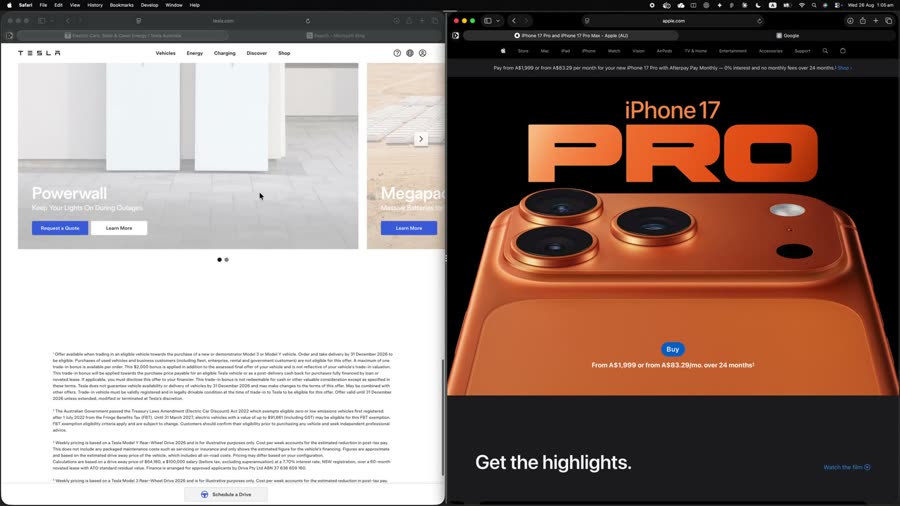
Two windows of the same app
A pane holds a window, not an app. So two Safari windows sit side by side — separate tabs, separate history, separate scroll position — and comparing two spec pages stops being a Command-Tab exercise.
Safari + Safari · Left / Right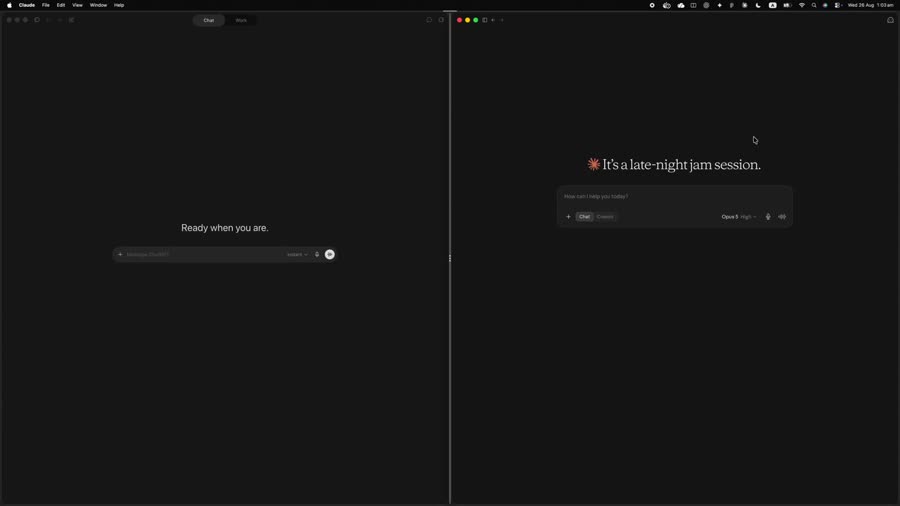
Let one AI check the other
Paste an answer from one into the other and watch it get picked apart — without a single window switch. The copy, the paste, and both replies stay on screen together, which is the only way cross-checking is worth the effort.
ChatGPT + Claude · Left / Right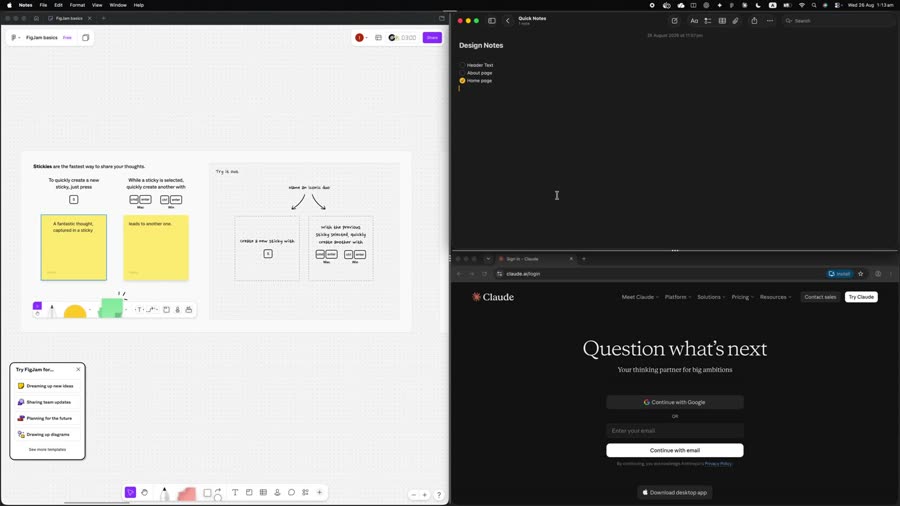
Give the canvas the room, keep the rest glanceable
One thing needs space; two things only need to be visible. The design tool takes the tall pane, the brief and the assistant stack beside it — and one drag of the divider changes the balance when the work does.
Figma + Notes + Claude · 1 Left / 2 Right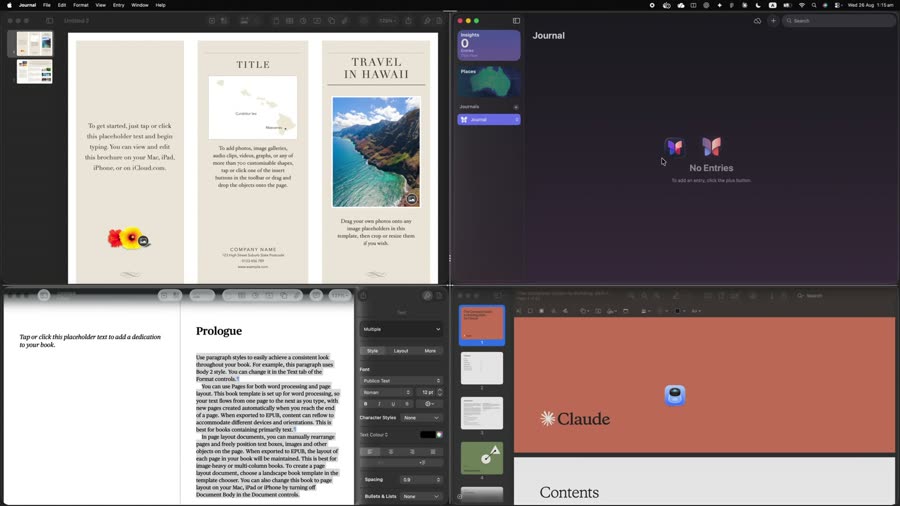
Four windows that only make sense together
The draft, the reference it draws on, the journal you log to, and somewhere to ask. Individually they are four windows to arrange every morning; as a workspace they come back in this exact 2×2 — and go away in one keystroke.
Pages + Journal + Pages + Claude · 2 × 2The workspace menu
Everything a workspace can do, in one menu.
Right-click the handle at the top of any group — or open This Workspace from the menu bar. Same list, both places.
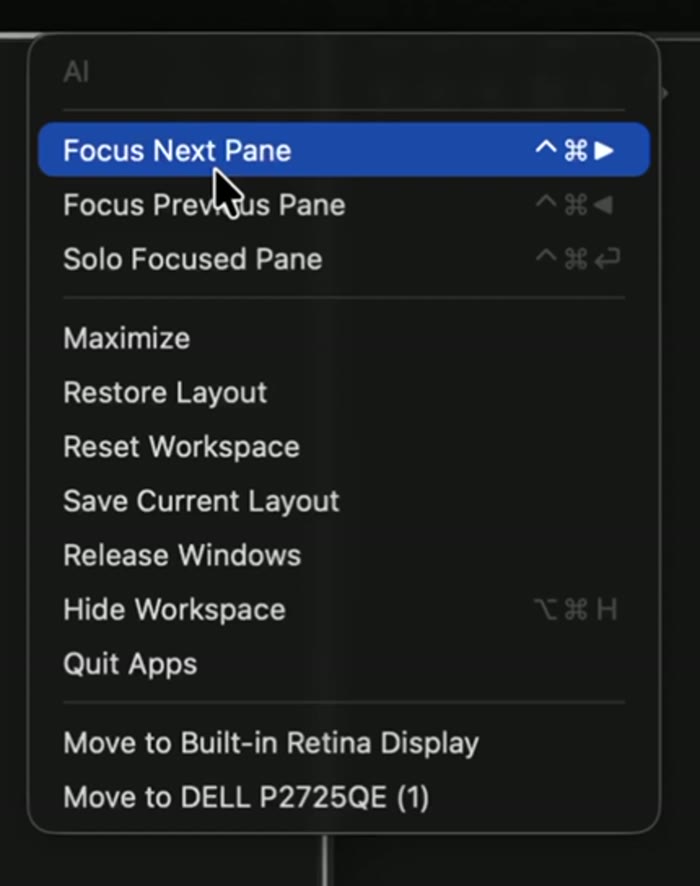
Move around inside it
- Focus Next / Previous Pane⌃⌘← →
- Move the keyboard between the apps in the group without reaching for the mouse or Command-Tab.
- Solo Focused Pane⌃⌘↩
- Blow one pane up to fill the whole workspace, then press again to drop it back into the layout — the other windows are never disturbed.
Change its shape
- Maximize
- Grow the whole group to fill the display it is on, keeping the split you set.
- Restore Layout
- Snap every window back into its pane after you have dragged them around by hand.
- Save Current Layout
- Make the arrangement you just dragged into place the one this workspace opens with from now on.
- Reset Workspace
- Throw away your adjustments and return to the layout’s default split.
Put it away — three ways, gentlest first
- Release Windows
- Stop tiling this group. Every window stays exactly where it is on screen, free to move and resize like any other window. Showing the workspace again puts them back.
- Hide Workspace⌥⌘H
- Tuck the whole group out of sight in one keystroke. Nothing quits; one click brings it all back.
- Quit Apps
- Close the apps in this workspace when you are properly finished with them.
Send it somewhere else
- Move to <display>⌥⌘B
- Send the entire group to another monitor as one object, split and proportions intact — no re-dragging window by window.
How it works
Set it up once. Bring it back whenever you need it.
Pick a layout
Open the visual builder and choose a layout — 2, 3, or 4 panes.
Fill the panes
The builder opens with your front windows already in place — swap any of them, or pick a different app.
Resize it
Drag the dividers to taste. The proportions are remembered — there is nothing to save.
Bring it back anytime
Show, hide, restore, or send it to your display — from the menu bar or a shortcut.
How to use
From install to your first workspace.
Set Panelet up in about a minute — a first-run guide walks you through it — then run your workspaces from the menu bar or a keyboard shortcut.
- 1
Install & open
Move Panelet to Applications and launch it — it lives in your menu bar.
- 2
Grant Accessibility access
Approve the macOS Accessibility permission so Panelet can move and place your app windows.
- 3
Create a workspace
Choose “New Workspace…” — the builder opens with the windows you already have open, arranged in the layout you pick. Swap any pane for a different app.
- 4
Resize it
Drag the dividers to size each pane. The proportions stick on their own — “Save Current Layout” is for when you have moved the windows around by hand and want that to become the default.
- 5
Bring it back anytime
From the menu bar — or a keyboard shortcut — show, hide, restore, maximize, or send the workspace to your current display.
Privacy & Accessibility
Private by design.
Panelet uses macOS Accessibility permission to move, resize, show, and hide your app windows. It does not read your app contents, record your screen, mirror windows, or embed other apps. Your workspace configuration is stored locally on your Mac. License validation may contact Lemon Squeezy.
About
A small, independent Mac app.
Panelet is an independent macOS utility built for people who work across multiple apps every day. It does one thing — keep the windows you work in grouped, arranged, and a keystroke away. No account required; activate with a license key. Designed to feel lightweight, predictable, and native to macOS.
FAQ
Questions, answered.
Is Panelet a window manager?
Not quite. Window managers snap or tile individual windows, one at a time. Panelet works a level up — it groups the windows you use together into a persistent workspace that moves, resizes, and reflows as one. You arrange a workspace, not windows.
Can I put two windows of the same app in one workspace?
Yes — a pane holds a window, not an app. Two Safari windows, or four windows of the same editor, can share one workspace, each keeping its own tabs, history and scroll position. Every pane also remembers which window belongs to it across Hide and Show.
How many windows can a workspace hold?
Two, three, or four, depending on the layout you pick: a left/right or top/bottom split, one of four three-pane arrangements, or a 2×2 grid. The count is exact — a layout tiles that many windows and tells you if one is missing, rather than half-building the workspace.
Which apps does it work with?
Most standard Mac apps, with no integrations or plug-ins — Panelet arranges whatever windows macOS exposes. Apps that only open a window once you pick a file (Pages, Preview, Numbers) are handled explicitly: Panelet prompts each one to show its open panel and names the apps the workspace is still waiting for.
Can I stop tiling without closing my apps?
Yes, and it's the gentlest of three exits. “Release Windows” stops managing a group and leaves every window exactly where it is on screen, free to move and resize like any other window — showing the workspace again snaps them back. “Hide” tucks the group away without quitting anything. “Quit Apps” is the only one that closes them.
What happens to my windows if I quit Panelet?
You get them back. Anything Panelet was hiding is handed back on quit, and after an unexpected termination it recovers them on the next launch. A tool that moves your windows around should never be able to strand one.
Does it work across multiple displays?
Yes. Send a whole workspace to another monitor as one object (⌥⌘B, or “Move to…” in its menu) with the split and proportions intact. If a display is unplugged, Panelet brings a stranded workspace back somewhere you can reach it.
What about macOS fullscreen and Stage Manager?
Panelet steps aside and tells you, rather than fighting the system. Native fullscreen and Stage Manager both take over window placement in ways no Accessibility-based tool can override, so Panelet gets out of the way while they're active and picks the workspace back up afterwards.
Why isn't Panelet on the Mac App Store?
The Mac App Store requires the sandbox, and the sandbox forbids controlling other apps' windows — which is exactly what Panelet does. This isn't a guess: we built it, tested it, and confirmed it with Apple's developer support. A notarized direct download is the only way a tool like this can ship.
Is Panelet safe to install?
Yes. Panelet is signed with an Apple Developer ID and notarized by Apple — Apple has verified the developer's identity and scanned every release before macOS allows it to run.
Why does Panelet need Accessibility permission?
macOS only lets an app move or resize other apps' windows through the Accessibility API, so Panelet needs it to arrange your workspace. It reads window position and size, and nothing else — never your screen contents, keystrokes, or data.
How do the trial, licensing and updates work?
There's a 7-day free trial, no account and no card. After that it's a one-time purchase — activate with a license key on up to 3 Macs, and updates arrive inside the app. No subscription and no paid upgrades: every future version is a free update, major releases included, and your license never expires.
Pricing
One price. Yours to keep.
Buy Panelet once and use it on up to 3 of your Macs. No subscription — ever.
Panelet license
about US$5.70 — charged in AUD
- 3 devices per license
- 7-day free trial — no card required
- Free updates, forever
- Works offline once activated
- Native Mac app · macOS 13+
- Never reads your app content
One-time purchase in AUD · secure checkout via Lemon Squeezy
Bring order to your Mac.
Group the apps you use together and bring them back whenever you need them.
7-day free trial · macOS 13+ · Native Mac app